

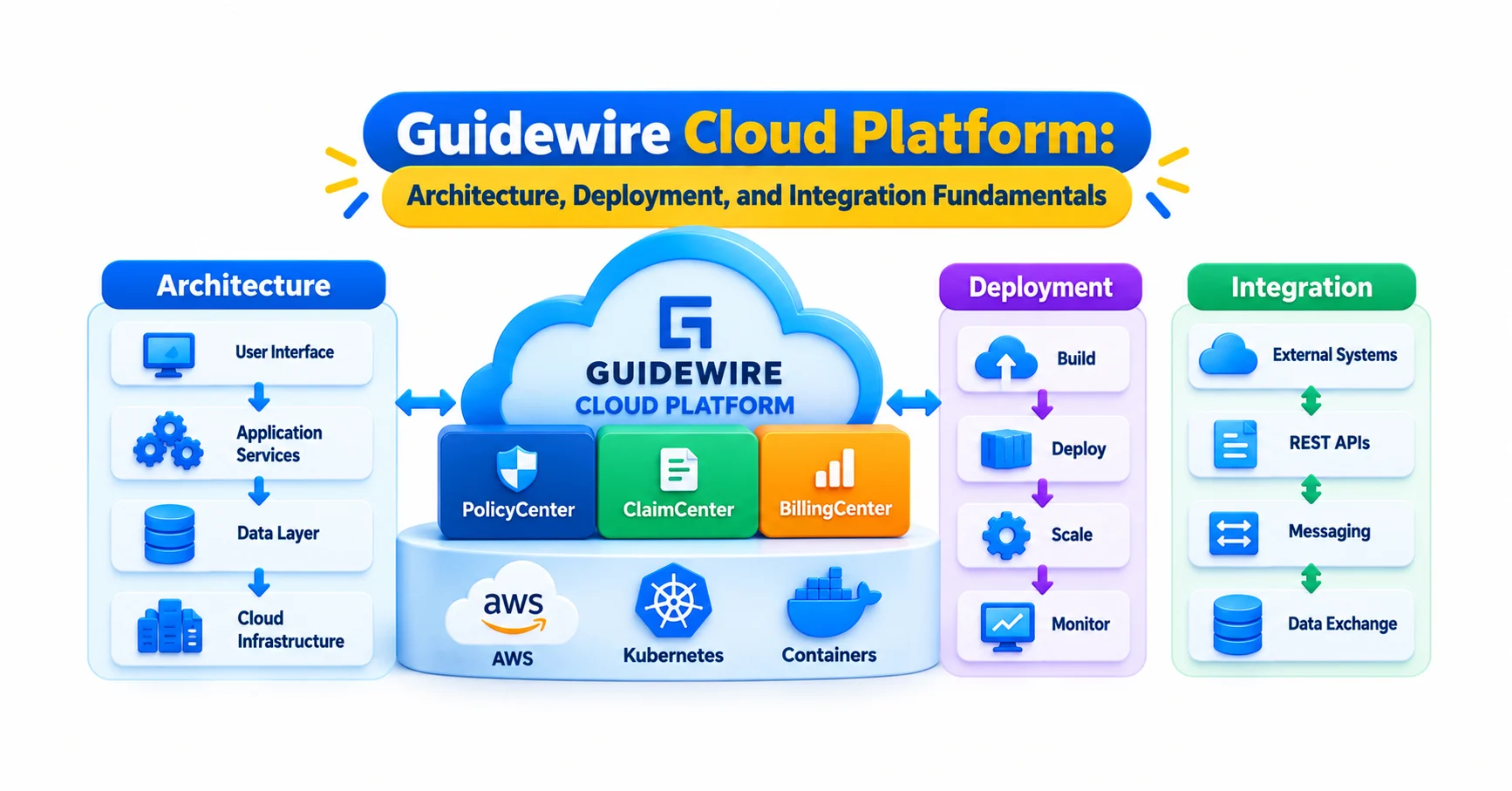
Guidewire Cloud Platform: Architecture, Deployment, and Integration Fundamentals
Navigate through this article using the table of contents below
Table of Contents
No headings found in this article.
Picture a claim being filed. Within seconds, a document service, a payment system and a fraud check all react to it, and none of them were wired into the core application code. That quiet coordination is what the Guidewire Cloud Platform is designed to make possible. It is also why anyone starting Guidewire training in Hyderabad now meets cloud concepts almost immediately.
But what actually sits underneath that coordination? And how does it differ from the on-premise Guidewire that older tutorials still describe?
What the Guidewire Cloud Platform Includes Beyond InsuranceSuite
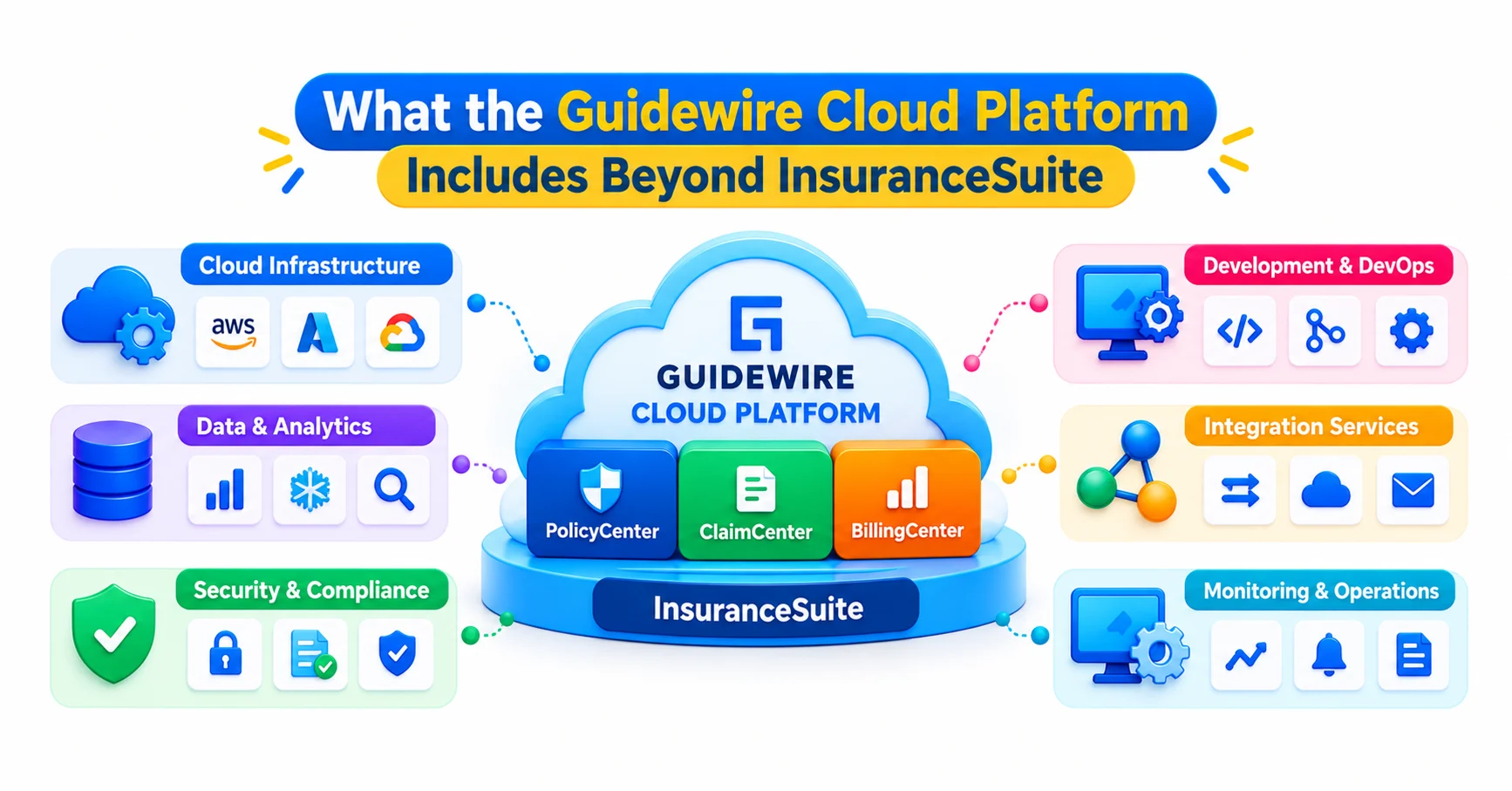
The Guidewire Cloud Platform is the environment in which Guidewire’s core insurance applications are built, deployed, run and connected to everything around them. Many beginners assume it simply means “PolicyCenter, BillingCenter and ClaimCenter hosted on someone else’s servers.” That is only part of the picture.
The InsuranceSuite applications are still the heart of it. Around them sits a set of services that Guidewire operates and updates: the cloud infrastructure that hosts the applications, tooling for managing builds and deployments, an API layer for inbound requests, and an event and integration layer for outbound communication. The Jutro Digital Platform covers front-end experiences, and Advanced Product Designer helps teams design and deploy insurance products.
The shift is easiest to see in how work is divided. On-premise, an insurer’s IT team owned the servers, installed upgrades and often customised the core code to reach other systems. In the cloud, Guidewire runs the infrastructure and delivers updates, while the customer’s team focuses on configuration, product design and integrations. That division only works if customisation stays out of places where it makes updates painful, which explains why the platform pushes teams toward APIs and events.
For a learner, this changes what “knowing Guidewire” means. Gosu and configuration skills still matter, but so does understanding where a requirement should be solved: inside the application, through an API, or through an event.
How the Architecture Fits Together, Layer by Layer
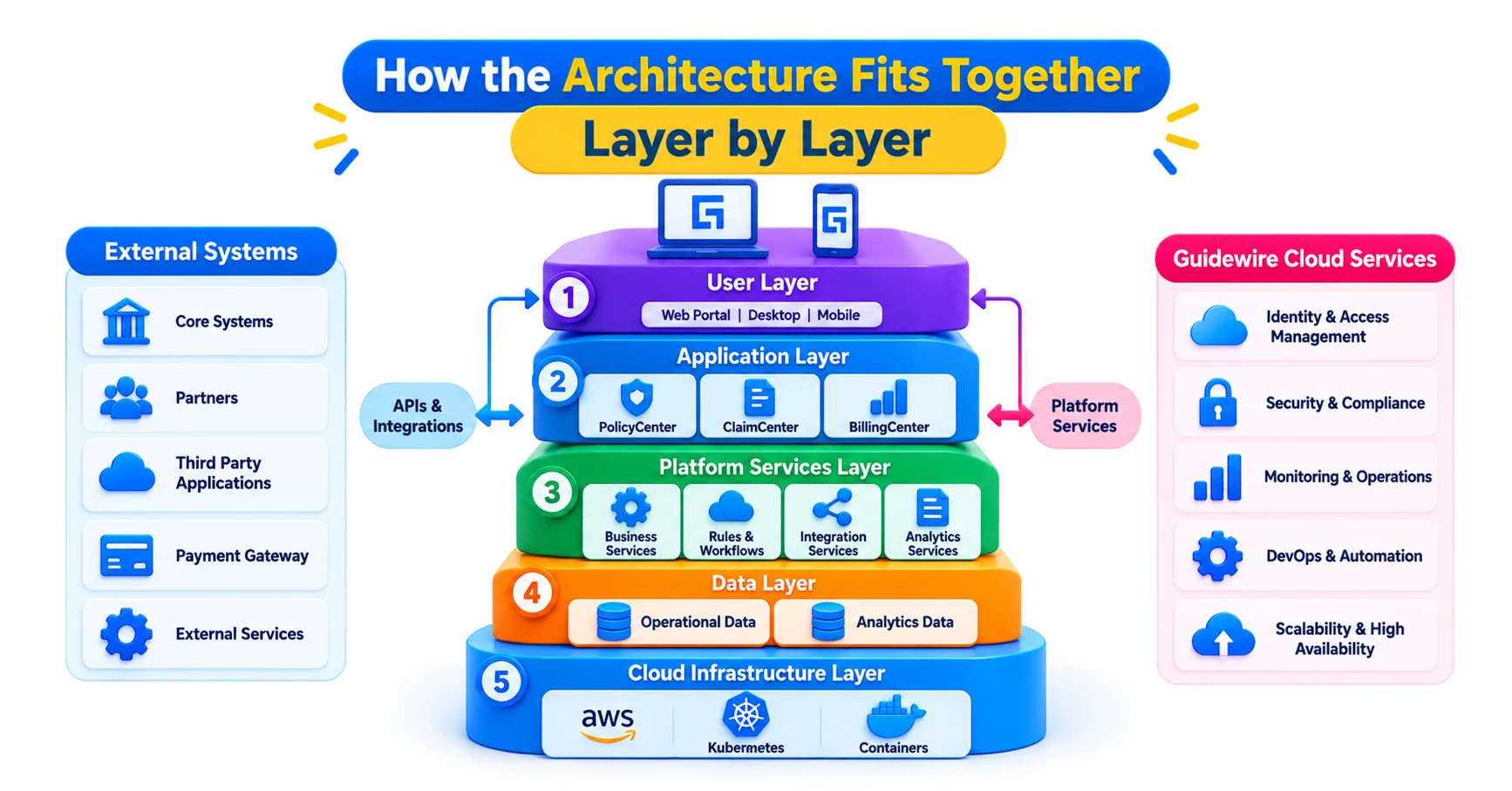
A useful way to hold the whole platform in your head is to think in four layers.
At the bottom is the cloud infrastructure, which hosts and runs the applications. You rarely touch this directly, and that is the point.
Above it sit the InsuranceSuite applications, which contain the business logic for policies, billing and claims. Their data model, rules and workflows are what you configure.
The third layer is the connection layer. Inbound, it is the InsuranceSuite Cloud API, which gives external applications standard access to core transactions and data. Outbound, it is App Events and Integration Gateway, which pass information from the core applications to other systems.
The top layer is experience. Jutro apps are web applications that combine static pages delivered through Guidewire Cloud’s content delivery network with business data pulled from InsuranceSuite API calls. They can run as standalone apps or as micro frontends embedded inside another application. Because they call the same APIs as any other client, a broker portal and an internal claims tool can share one backend without sharing one codebase.
One design principle runs through all four layers: keep integration and presentation separate from business logic. Guidewire’s own guidance describes integration apps being deployed alongside the core applications rather than inside them, which leaves more room to change a solution and makes cloud updates easier to absorb.
A common beginner error is to treat these layers as a menu of tools. They are better understood as a set of boundaries. Each boundary tells you what belongs on one side and what should stay on the other.
Where Data Lives and Why Data Architecture Still Matters
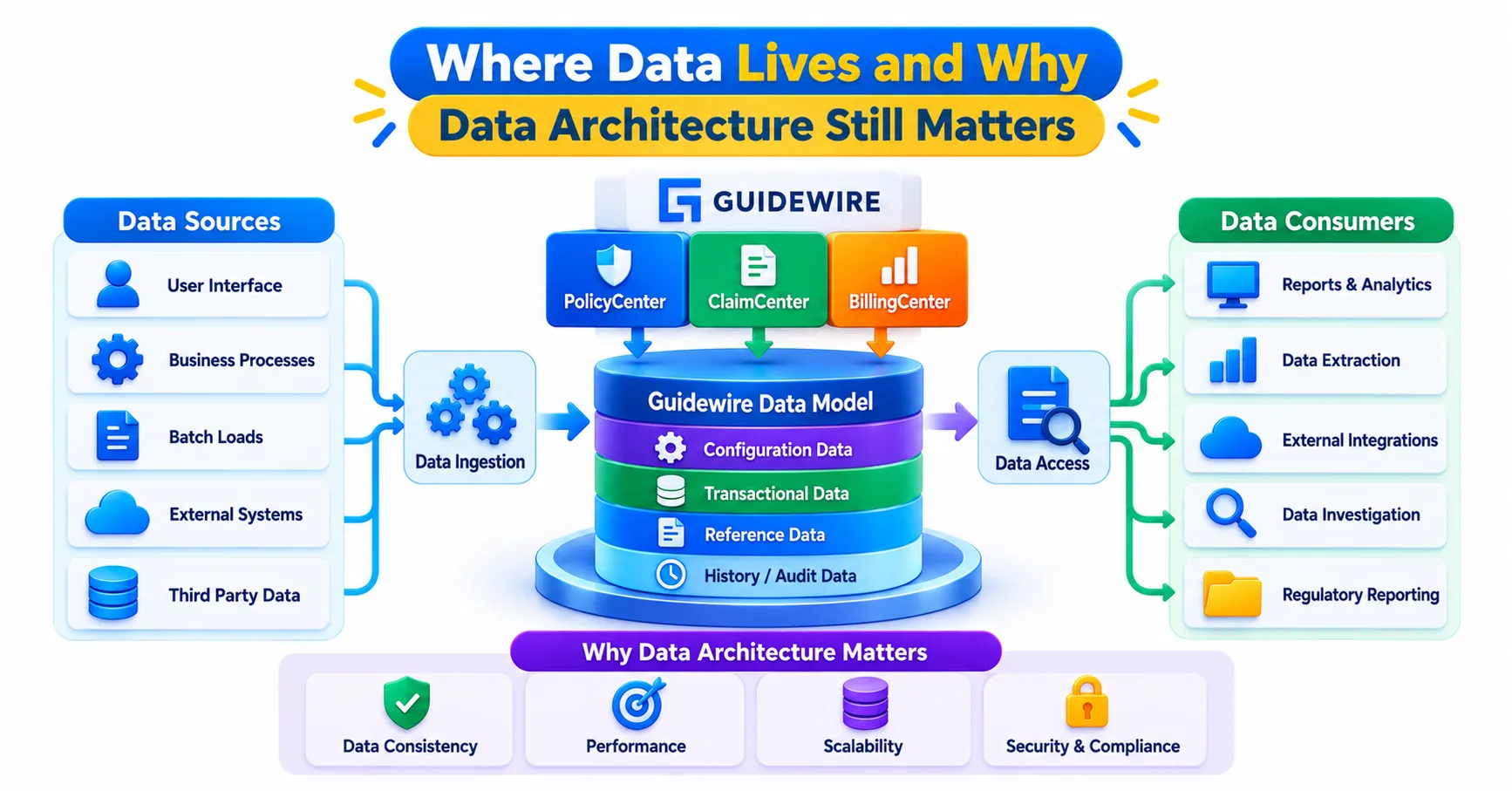
Moving to the cloud does not remove the need to understand the data model. If anything, it raises the stakes, because every API response, event payload and Jutro screen is a view of the same underlying entities.
Consider a simple quote request. A front-end collects driver and vehicle details, an API call creates a submission, and the policy data is stored against entities with their own relationships, typelists and effective dates. If you do not know how those pieces connect, you will struggle to read an API response, let alone design an integration around it. That is why many learners benefit from studying the Guidewire data architecture module before they touch integration work. It explains how the entities, relationships and data structures behave underneath everything else.
Data also moves outside the transactional applications. Guidewire’s integration thinking separates two kinds of need. Real-time interactions, such as creating a claim or reacting to a billing change, go through APIs and events. Batch data needs, such as financial or regulatory reporting and feeding a data warehouse, belong to the Guidewire Data Platform. Mixing the two up is a classic design mistake. Teams that pull large reporting extracts through transactional APIs end up with slow processes and unhappy system owners.
A practical habit helps here. When a requirement mentions data, ask three questions. Is it needed immediately or in bulk? Does a business transaction produce it, or is it a periodic extract? Who owns the entity at the source? The answers usually point to the right mechanism before you write a single line of code.
Guidewire Home, Builds and Deployment: How Changes Reach Production
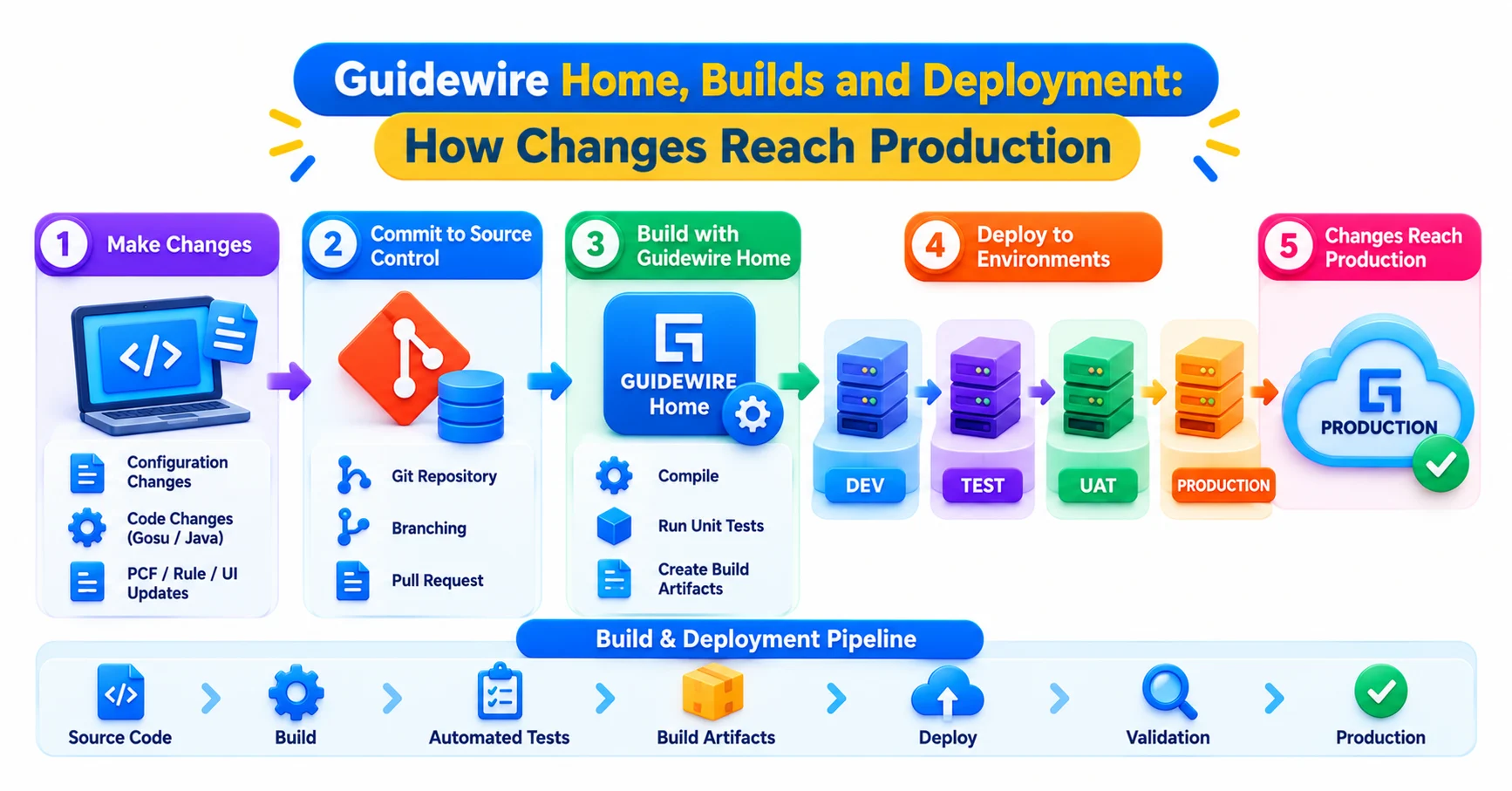
Deployment is where cloud work feels most different from the old way. Rather than installing packages on servers, teams work through Guidewire’s cloud tooling to build, review and release changes.
Guidewire Home is the front door. Guidewire Cloud Console was folded into it, so the applications a team uses sit in one place, with a landing page that summarises builds, deployments and application status. From there you can jump to a build to check or fix a problem, open Lifecycle Manager to commit and deploy available changes, and redeploy an application that is not running. It also allows pinning of frequently used apps and documentation, plus global search.
Think about what a normal change looks like. A developer changes configuration or code and pushes it through source control. A build runs and either succeeds or fails. If it succeeds, the change becomes something that can be deployed to an environment. Teams typically keep separate environments for development, testing and production, so a change earns its way forward rather than landing everywhere at once.
The practical lesson is that a failed build is information, not an emergency. Beginners often panic when a build breaks, yet most failures come from a handful of causes: a syntax slip, a missing dependency, or a configuration that conflicts with another change. Reading the build output carefully usually solves it faster than guessing.
Deployment discipline also protects you during cloud updates. Because Guidewire delivers releases on its own schedule, a codebase with minimal, well-organised customisation upgrades far more smoothly than one full of shortcuts. Good deployment habits and clean customisation are really the same habit viewed from two sides.
The InsuranceSuite Cloud API: Connecting Without Touching the Core
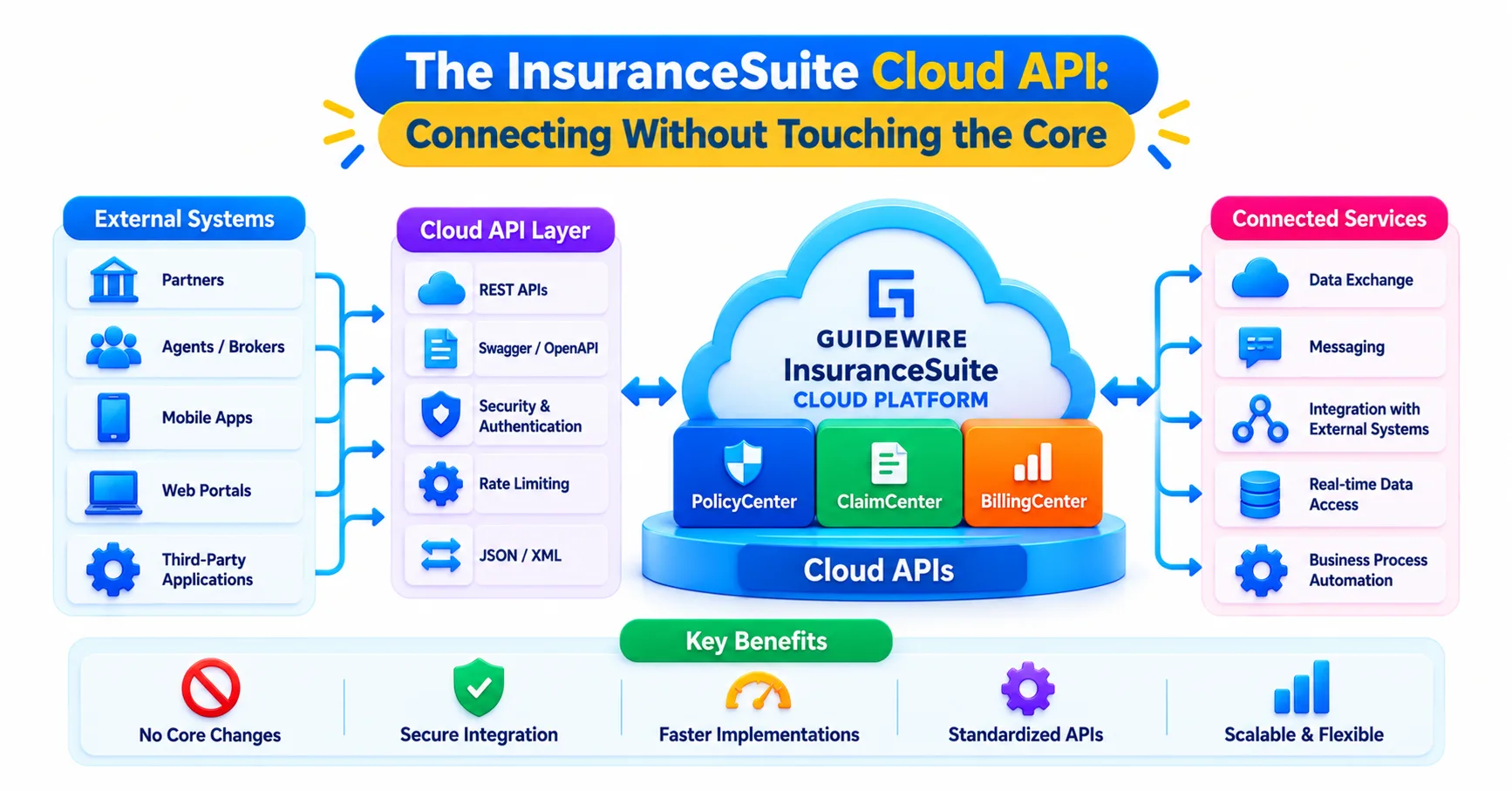
The InsuranceSuite Cloud API is the standard way for external applications to talk to Guidewire. It provides RESTful access to core transactions and data across claims and policy functions. It arrived with the Banff release, specifically so enterprises could connect their apps and services without changing the code base of the core application.
That last point deserves attention. In older on-premise projects, a new integration often meant writing Gosu, adding a plugin or exposing a custom web service inside the application. Each addition made upgrades harder. The Cloud API reverses that logic: the capability already exists as a supported interface, so the integration lives outside the core.
Here is a hypothetical example. A broker portal needs to show a customer’s active policies and let them request a change. The portal’s developers call the Cloud API to retrieve policy data and to start the change transaction. No new code is deployed inside PolicyCenter, and the portal team can ship updates on their own timeline. The API can also be called from within Integration Gateway apps, which matters when a request needs transformation or orchestration before it reaches Guidewire.
Some habits make API work easier. Read the API documentation for the version you are using, since schemas evolve. Treat authentication and permissions as first-class design concerns rather than afterthoughts. Keep payloads focused, requesting what the screen or process needs instead of fetching everything. And test with realistic data, because empty test records hide the edge cases that production will expose.
The API answers the question “how does outside software ask Guidewire for something?” But what about the reverse, when Guidewire needs to tell the outside world that something happened?
App Events and Integration Gateway: Moving From Polling to Events
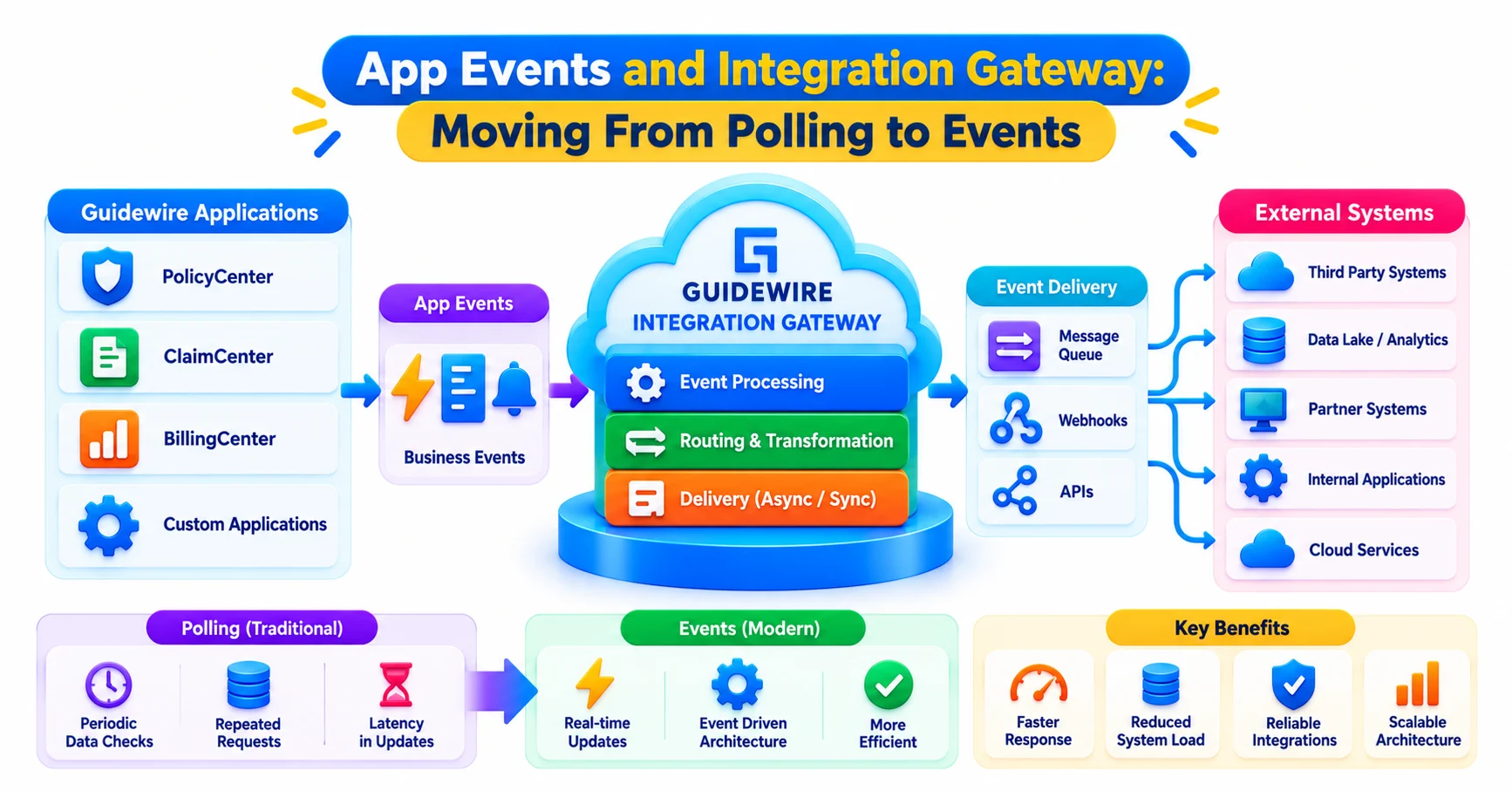
Outbound communication is where the platform’s event-driven design shows. Application Events, usually called App Events, expose business events from InsuranceSuite through a no-code mechanism. It is the outbound counterpart to the Cloud API. Instead of an external system repeatedly asking “has anything changed?”, it subscribes and is told when something does.
App Events can be delivered in two main ways. Webhooks send an event to a web endpoint that an administrator configures without coding. Integration Gateway takes events and does more with them. It is a framework for building integration apps that bridge Guidewire APIs with external applications and services, and it includes a Camel component for App Events, so an app can subscribe to particular events, transform the message and call the right API on the receiving system. Guidewire has also described a workflow service as a further consumer.
Consider the opening example again. When a claim is created, an event is published. A webhook might notify a lightweight notification service, while an Integration Gateway app maps the data to the format a payments provider expects and calls its API. The core ClaimCenter code has no knowledge of either destination.
This approach reduces custom code in InsuranceSuite, which is exactly its purpose. Integration apps run beside the core applications, so you can change an integration without risking the claims logic.
For people moving from on-premise backgrounds, the mental shift is from messaging plugins and tightly coupled web services toward events and loosely coupled apps. Knowing the older messaging model still helps, since many existing projects carry it, but new cloud work leans on events. Understanding both lets you read legacy designs and plan their gradual replacement.
Common Mistakes and What Learners Should Practise First
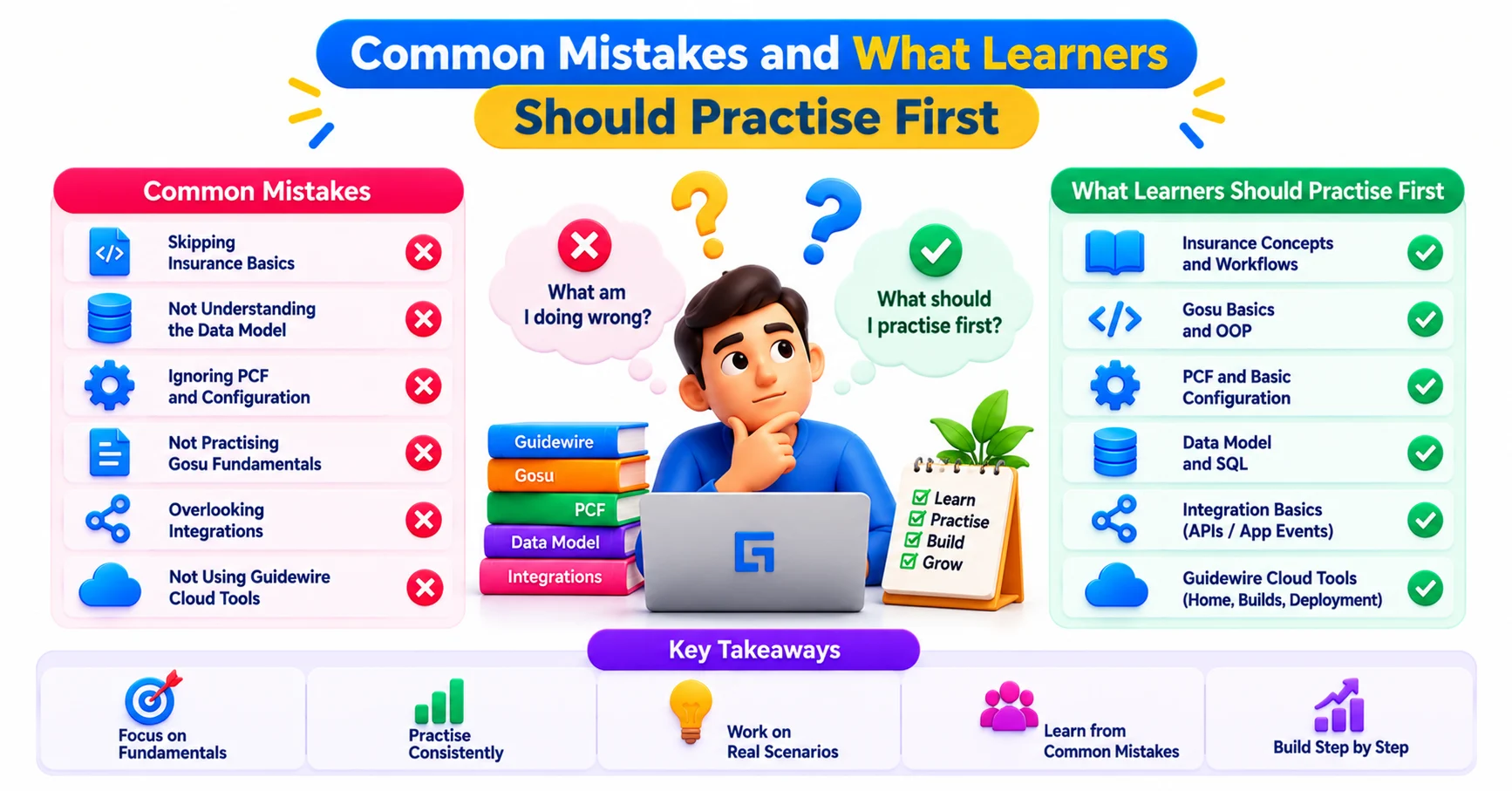
Most problems on cloud projects trace back to a few recurring misjudgements.
The first is rebuilding the on-premise past in the cloud. Teams that copy old Gosu-heavy integrations straight across end up with the same upgrade pain in a new location. A better approach is to ask, for each integration, whether an API call, an event or an Integration Gateway app would do the same job outside the core.
The second is confusing real-time and bulk needs, as described earlier. The third is neglecting the data model and then blaming the API when responses seem confusing. The fourth is treating deployment as someone else’s responsibility. Developers who understand builds, environments and release flow solve issues faster and make fewer risky changes.
So what should a learner practise? Start with the data model and core application concepts. Then learn how REST APIs work in general, including authentication, status codes and JSON, because that knowledge transfers directly to the Cloud API. After that, study events and the idea of subscribing to them, then explore how Integration Gateway apps transform and route messages. Finally, spend time reading build output and understanding how a change travels from a developer’s machine to a running environment.
Training providers such as JastTech increasingly frame Guidewire learning around these cloud-era skills rather than treating them as an add-on. A candidate who can explain why a requirement should use an event instead of a custom plugin sounds noticeably more prepared in interviews than one who can only recite feature names.
Hands-on work matters most. Build a small scenario, such as a mock policy lookup through an API or an event that triggers a notification, and walk it through from design to deployment. Even a modest project exposes gaps that reading never will.
Conclusion
The Guidewire Cloud Platform is best understood as a set of boundaries: applications at the core, APIs for requests coming in, events for news going out, and tooling that carries changes safely to production. Learn where each responsibility belongs and the platform stops looking like a pile of products. It starts to look like a design you can reason about, extend and explain with confidence.